What is the difference between a simple product and a variable product in WooCommerce?
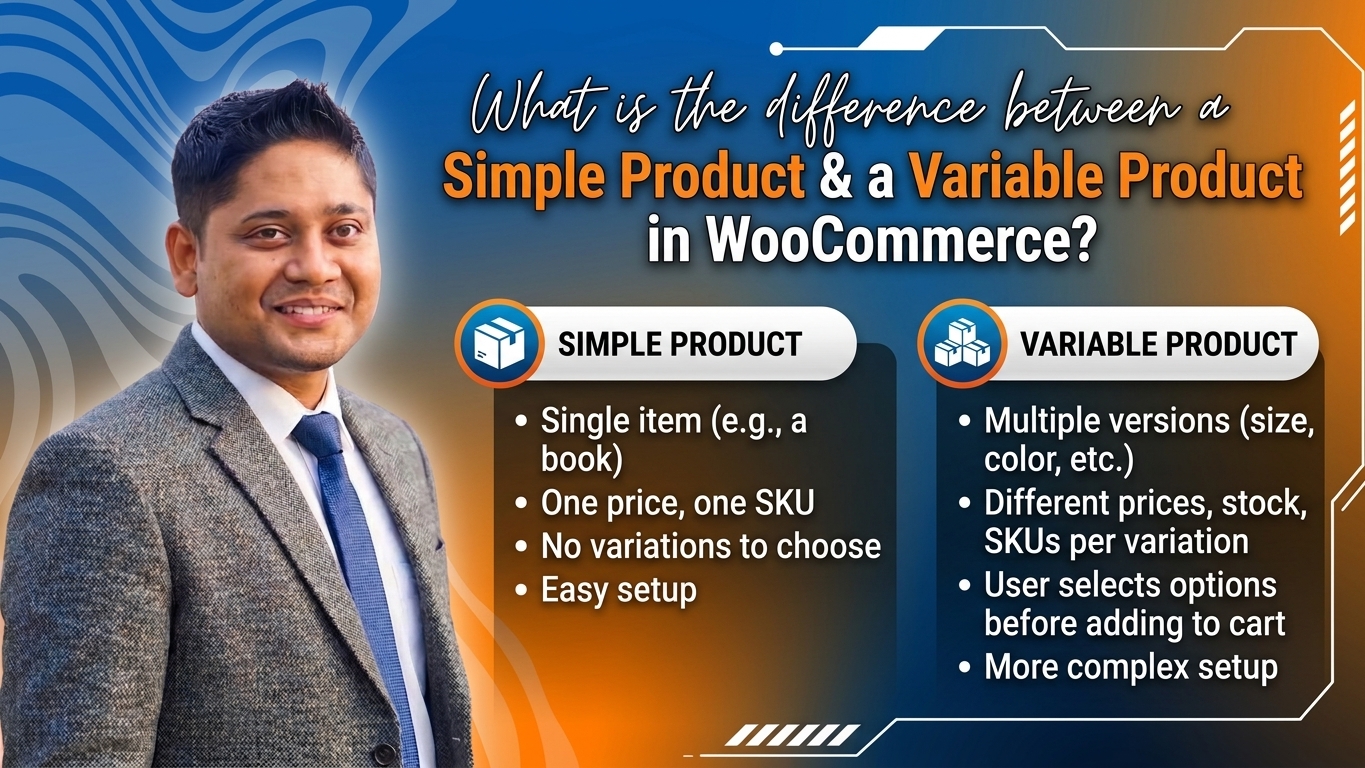
What is the difference between a simple product and a variable product in WooCommerce? Welcome to another comprehensive masterclass designed specifically for e-commerce entrepreneurs, store owners, and developers managing siddiquedigital.com and targeting visitors across Bangladesh. If you have recently launched your online storefront using WordPress and WooCommerce, mastering product types is one of the most vital steps in building a seamless user experience and achieving high Google search rankings.
When customers land on your online shop, they expect a smooth, intuitive shopping journey. Whether you are selling handcrafted Jamdani sarees, custom-branded mugs, smartphones with varying storage capacities, or digital software licenses, WooCommerce handles your inventory through specific product structures. Among these, Simple Products and Variable Products are the two foundational building blocks that every store owner must master.
In this exhaustive, masterclass-level guide tailored specifically for siddiquedigital.com, we will explore the precise definitions, structural differences, inventory management techniques, SEO optimization strategies, and real-world e-commerce applications of simple versus variable products. Let’s dive deep and elevate your WooCommerce expertise!
Part 1: Foundations of WooCommerce Product Types
Before comparing simple and variable products head-to-head, it is essential to understand how WooCommerce organizes items in its database. When you navigate to Products > Add New in your WordPress dashboard, you encounter the Product Data meta box. This control center dictates how an item is displayed, priced, taxed, and shipped.
1. The WooCommerce Product Ecosystem
WooCommerce natively supports several product types to accommodate different business models:
- Simple Product: A single, standalone item with one price, one SKU, and fixed attributes.
- Variable Product: A single parent product that contains multiple variations based on attributes like size, color, or material.
- Grouped Product: A collection of related standalone products that can be purchased individually or together.
- External / Affiliate Product: An item listed on your site but sold on an external platform (useful for affiliate marketing).
- Virtual / Downloadable Product: Items that do not require shipping, such as e-books, online courses, or software licenses.
Part 2: What is a Simple Product?
A Simple Product is the most straightforward, fundamental product type in WooCommerce. It represents a single, distinct item with no complex variations or options for the buyer to choose from.
1. Characteristics of a Simple Product
- Single SKU (Stock Keeping Unit): Every simple product has one unique inventory tracking number.
- Fixed Pricing: The price remains constant unless you schedule a promotional sale price for a specific date range.
- Straightforward Inventory: When a customer buys the item, your stock count decreases by exactly one unit.
- No Variations: Customers cannot select colors, sizes, or materials on the product page. If you sell a red t-shirt in size Medium as a simple product, the user cannot change the color or size; they simply buy that exact item.
2. When to Use a Simple Product
You should use a Simple Product when:
- Selling a physical item that comes in only one size, color, or edition (e.g., a specific book title, a branded coffee mug, or a pre-assembled electronic gadget).
- Selling a digital download or service (e.g., an e-book PDF or a one-time consultation service).
- Creating individual landing pages for high-margin products where you want zero friction in the checkout process.
Part 3: What is a Variable Product?
A Variable Product is a powerful WooCommerce product type that allows you to sell a single parent product with multiple variations. Instead of creating separate product pages for every single color and size combination, you group them under one unified listing.
1. Anatomy of a Variable Product
To set up a variable product, you must configure two key elements:
- Attributes: Characteristics used to define variations (e.g., Color, Size, Storage Capacity, Material). Attributes can be global (usable across your entire store) or custom (created specifically for that single product).
- Variations: The actual distinct combinations generated from your attributes. For example, if you have 3 Colors (Red, Blue, Green) and 2 Sizes (S, M), WooCommerce automatically generates up to 6 unique product variations.
2. Advanced Control Per Variation
Each individual variation within a variable product can have its own:
- Unique Price & Sale Price: (e.g., the XL size can cost more than the S size).
- Unique SKU & Stock Status: (e.g., Blue-Medium is in stock, but Red-Small is sold out).
- Individual Image: (e.g., selecting the “Red” color swatch instantly changes the main product image to show the red version).
- Weight and Dimensions: Useful for calculating accurate shipping rates across Bangladesh.
3. When to Use a Variable Product
You should use a Variable Product when:
- Selling apparel, shoes, or fashion items available in multiple sizes and colors.
- Selling tech gadgets or smartphones with different RAM/storage options (e.g., 128GB vs. 256GB).
- Offering customizable subscription tiers, gift packages, or product bundles.
Part 4: Direct Comparison: Simple vs. Variable Product Matrix
To understand how these two product types stack up against each other across critical e-commerce metrics, review the comprehensive comparison matrix below:
| Feature / Metric | Simple Product | Variable Product |
| Complexity | Extremely low; easy to set up and manage. | Moderate to high; requires attributes and variation setup. |
| SKU Count | Exactly 1 SKU per product. | Multiple SKUs (1 parent SKU + individual variation SKUs). |
| Pricing Structure | Single fixed price (plus optional sale price). | Dynamic pricing (each variation can have a unique price). |
| Inventory Tracking | Tracks total stock of the single item. | Tracks stock individually for every single variation. |
| User Interface | “Add to Cart” button appears immediately. | Dropdown menus or swatches required before adding to cart. |
| Page Load Speed | Faster database queries and rendering. | Slightly heavier database queries due to variation matrix. |
| SEO Optimization | Easier to target precise long-tail keywords. | Excellent for capturing multiple variant search queries. |
| Best Used For | Standalone books, digital files, single-edition goods. | Apparel, shoes, multi-spec electronics, customizable items. |
Part 5: Product Reviews & Plugin Optimization Matrix
Managing simple and variable products efficiently often requires specialized WooCommerce extensions and plugins. Here is a curated review matrix of essential tools for your online store at siddiquedigital.com:
| Plugin / Tool Name | Category | Primary Benefit | Pricing Tier |
| WooCommerce Variation Swatches | UX Enhancement | Replaces boring dropdown menus with visual color and image swatches. | Freemium ($49/yr) |
| WooCommerce Bulk Stock Management | Inventory Tool | Allows quick bulk editing of stock quantities for simple and variable items. | Paid ($79/yr) |
| Rank Math SEO Pro | SEO Optimization | Injects product schema markup and optimizes product meta descriptions. | Freemium ($69/yr) |
| Advanced AJAX Product Filters | Navigation | Helps mobile shoppers filter variable attributes instantly without page reloads. | Paid ($44/yr) |
How to Choose the Right Plugin for Your Store
- If your variable products feature multiple colors and sizes, Variation Swatches drastically improve mobile conversion rates. Bangladeshi shoppers prefer tapping a visual color swatch rather than selecting from a text dropdown menu.
- Always ensure your inventory management plugins support variable SKUs, especially if you sync your online store with physical retail stock in Dhaka or Chattogram.
Part 6: SEO Strategy for Simple and Variable Products
Optimizing product pages for Google search is critical for driving organic traffic to siddiquedigital.com. However, simple and variable products require distinct SEO approaches.
1. SEO for Simple Products (High Precision)
Because a simple product represents one specific item, you can hyper-optimize your title tags and meta descriptions around precise, long-tail search queries.
- Example Title:
Buy Organic Sundarban Honey 500ml Online in Bangladesh | siddiquedigital.com - Benefit: High relevance for specific transactional search intent.
2. SEO Challenges and Solutions for Variable Products
Variable products pose a unique SEO challenge: if all variations (e.g., Red T-Shirt, Blue T-Shirt, Green T-Shirt) share a single URL, Google may struggle to rank specific color variations unless handled correctly.
- Canonical Tag Discipline: Ensure all variation URLs canonicalize back to the main parent product URL to avoid duplicate content penalties.
- Descriptive Content: Write a rich, 300+ word product description detailing the entire range of variations available, incorporating semantic keywords (e.g., fabric types, size charts, color palettes).
- Structured Data (Schema Markup): Use an advanced SEO plugin like Rank Math to output correct
ProductandOfferschema, enabling Google to display aggregate star ratings, pricing ranges, and stock availability directly in search results.
Part 7: Actionable Tips for Managing Products on siddiquedigital.com
Implement these expert tips to maximize efficiency, user experience, and search rankings on your website:
- Keep Parent SKUs Clean: Establish a logical SKU naming convention (e.g.,
SHIRT-MENS-01for simple items, andSHIRT-MENS-01-RED-Lfor variable items). This prevents confusion during warehouse fulfillment in Bangladesh. - Compress Product Images: Variable products often require multiple image uploads (one for each color variation). Always compress images into WebP format using plugins like ShortPixel to prevent slow mobile loading times.
- Set Default Variations Wisely: For variable products, configure your most popular size or color as the default selection so customers see an immediate price and stock status upon landing on the page.
- Monitor Out-of-Stock Variations: Enable stock management at the variation level so that if one specific size sells out, customers can still buy other available sizes without abandoning the page.
- Leverage Internal Linking: Link your simple and variable product pages within your blog posts and category descriptions to distribute link equity and guide users smoothly toward checkout.
Part 8: 10 Large FAQs About Simple and Variable Products in WooCommerce
1. What is the fundamental difference between a simple product and a variable product in WooCommerce?
A simple product is a single, standalone item with one fixed price, one SKU, and no options for the buyer. A variable product is a single parent product that contains multiple variations (such as different sizes or colors), each with its own unique price, stock level, and SKU.
2. Can a simple product be converted into a variable product later?
Yes, but you cannot simply click a button to transform it. You must edit the simple product, change the product type dropdown to “Variable Product,” set up your attributes and variations from scratch, and re-enter your pricing and inventory details.
3. Do variations within a variable product share the same URL?
Yes. By default, all variations of a variable product share the same parent product URL. When a customer selects a different color or size, WooCommerce dynamically updates the price and stock status using JavaScript without reloading the page.
4. How many variations can a single variable product have?
While WooCommerce does not enforce a hard coding limit on the number of variations, having hundreds of variations on a single page can slow down server response times and overwhelm customers. It is generally recommended to keep variations under 30 to 50 per product for optimal performance.
5. Can each variation have a different shipping weight and dimension?
Yes! In WooCommerce, under each individual variation settings tab, you can specify unique weights and dimensions. This is especially useful if shipping costs across Bangladesh vary based on the physical size and weight of specific product variations.
6. Why is my “Add to Cart” button disabled on a variable product page?
The “Add to Cart” button on a variable product page remains grayed out until the customer selects an option for every required attribute (for example, selecting both a Color and a Size). Once all attributes are chosen, the price and “Add to Cart” button become active.
7. How do variation swatches improve my store’s conversion rate?
Default WooCommerce uses standard text dropdown menus for attributes. Installing a variation swatch plugin replaces these dropdowns with visual color circles, button pills, or image thumbnails, allowing mobile shoppers in Bangladesh to select their preferred options instantly with a single tap.
8. How does inventory management differ between simple and variable products?
For a simple product, you manage stock on the main product data tab. For a variable product, you must either manage stock at the parent level or—recommended for precision—toggle stock management per variation, assigning exact inventory counts to every distinct size and color combination.
9. Will Google rank individual variations separately in search engine results?
Usually, Google indexes and ranks the main parent product URL. However, if you create dedicated landing pages or use advanced URL parameters for specific high-volume search variations, those specific pages can occasionally rank independently, though canonical tags are necessary to prevent duplicate content issues.
10. Which product type should I use for a product that comes in different colors?
If the color is the only difference and all other factors (price, weight, dimensions) remain identical, you should still use a Variable Product if you want customers to select their preferred color on a single page. Alternatively, if you want each color to rank independently for specific search queries, you can create separate Simple Products and cross-link them using related product grids.
Conclusion
Understanding the precise differences between simple and variable products is vital for building a high-performance, scalable e-commerce store at siddiquedigital.com. Simple products offer streamlined simplicity and lightning-fast checkout for standalone items, while variable products provide the flexibility needed to showcase multi-attribute catalogs like apparel and electronics to your target audience in Bangladesh.
By structuring your catalog correctly, utilizing advanced variation swatches, implementing robust inventory tracking, and optimizing your pages for Google search, you create a professional, trustworthy online shopping destination. Embrace these WooCommerce best practices today, and watch your e-commerce platform thrive in the digital economy!







Post Comment